
S-106881 Community - Synchronization pop-up update on Login
Description
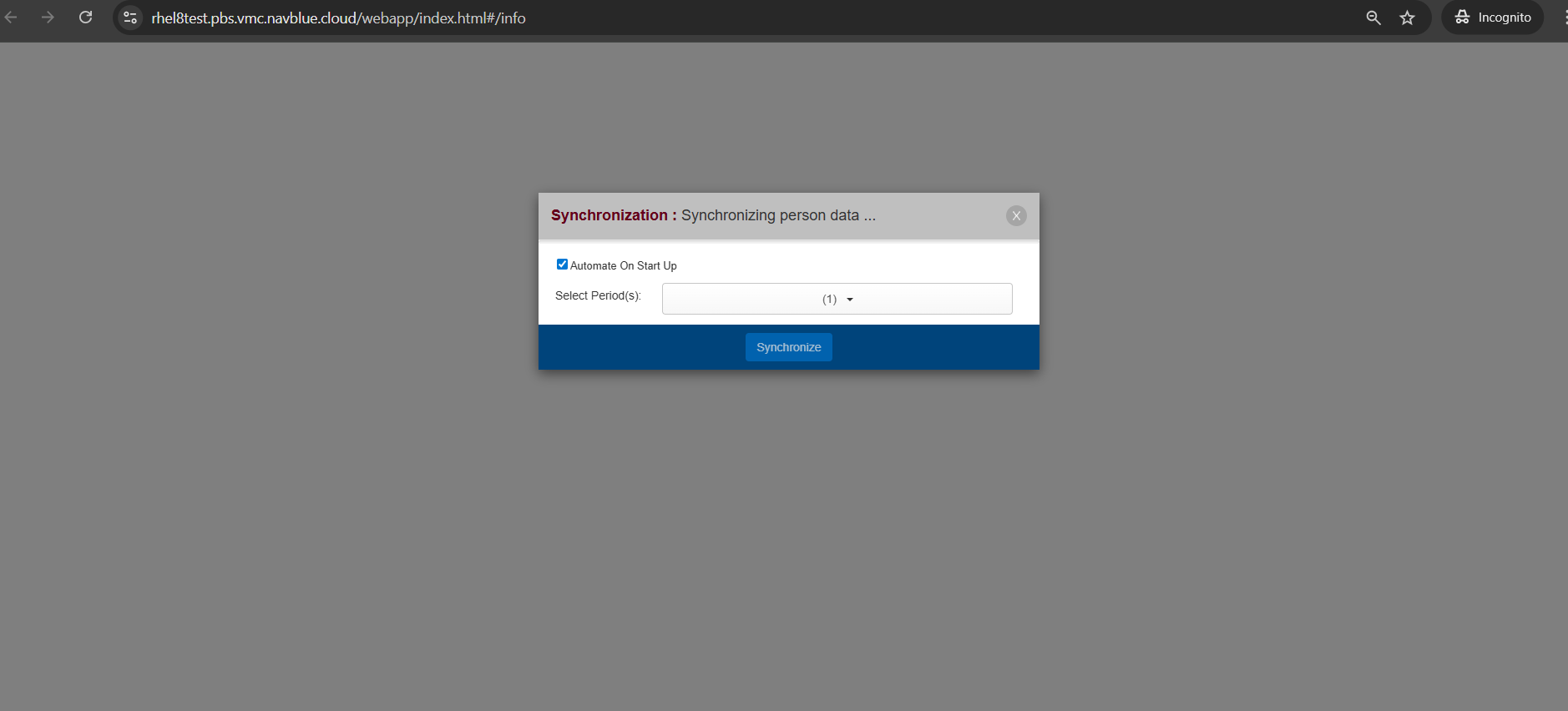
Updated the Bidder UI to feature a new loading icon and explicit "Synchronizing" status message during data sync operations. For crew members with "Automate on Start Up" enabled, the new indicator displays automatically upon application launch. When automatic startup sync is disabled, the updated loading icon and message appear immediately after the bidder manually initiates synchronization from the popup menu.
NOTE:
The popup will be displayed when the bidder manually clicks the sync button in the application.
These changes are for ALC's who have AutomateSyncOnStartUp set to False
Acceptance Criteria
GIVEN any bidder
WHEN the automate on start up is checked
THEN I will see the new loading icon with Synchronizing message.
GIVEN any bidder
WHEN the automate on start up is unchecked and when I click the synchronize button
THEN I will see the new loading icon with Synchronizing message.
GIVEN any bidder
WHEN they are already logged into the application and they click the sync data button
THEN I will see the existing synchronization pop up.
S-107857 Community - Warning message enhancement when there is no user-generated bid group following a bid group with Clear Schedule Start Next and mixed with ESN Bid Group
Description
Enhanced Validation Warnings for Unresolved Bid Group Transitions
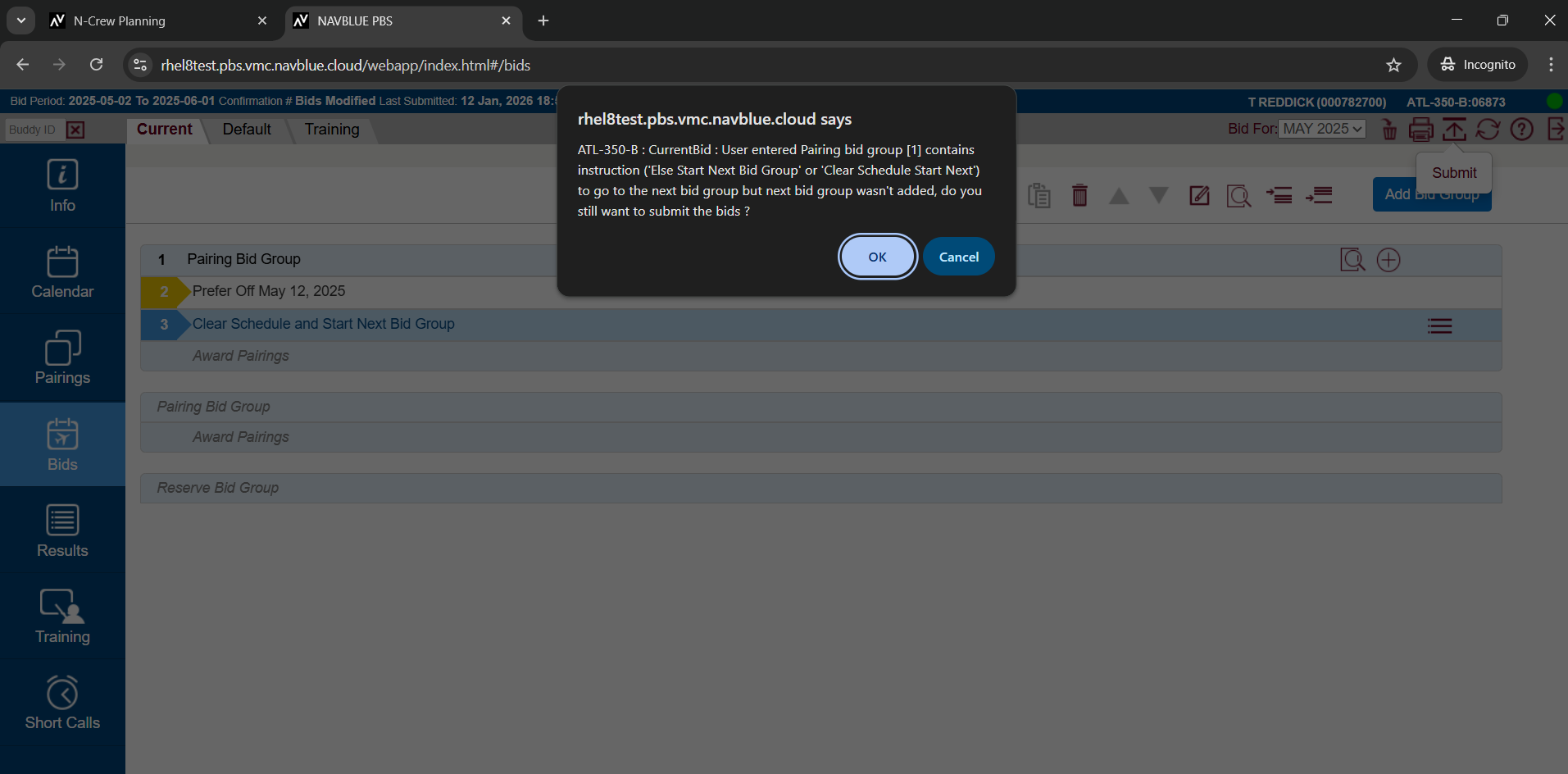
Line-Specific Identification: Warning prompts now explicitly state the affected bid group name and exact line numbers (for single or multiple lines) containing "Else Start Next Bid Group" or "Clear Scheduler & Start Next Bid Group" instructions that lack a target group.
Multi-Tab Coverage: Updated warning logic applies across both Current and Default bid tabs, presenting clear, structured notifications if missing group targets exist on one or both tabs simultaneously.
Actionable Submission Prompts: Replaced technical syntax errors with clear, user-friendly text that highlights potential bidding logic gaps while allowing bidders to confirm whether they still wish to submit.
Acceptance Criteria
GIVEN any bidder
WHEN there is a pairing or reserve bid group with a CSSNB bid & there is no following user-generated bid group & when I click submit
THEN I will see the new updated warning message with the updated UI
GIVEN any bidder
WHEN there is a pairing or reserve bid group with a ESNB bid & a CSSNB bid & there is no following user-generated bid group & when I click submit
THEN I will see the new updated warning message with the updated UI
GIVEN any bidder
WHEN there is a pairing or reserve bid group with a CSSNB bid & there is a following user-generated bid group & when I click submit
THEN I will NOT see the new updated warning message.
S-106746 Community - Warning message enhancement when there is no user-generated bid group following a bid group with Else Start Next Bid Group
Description
Enhanced Submission Validation for "Else Start Next Bid Group" Instructions
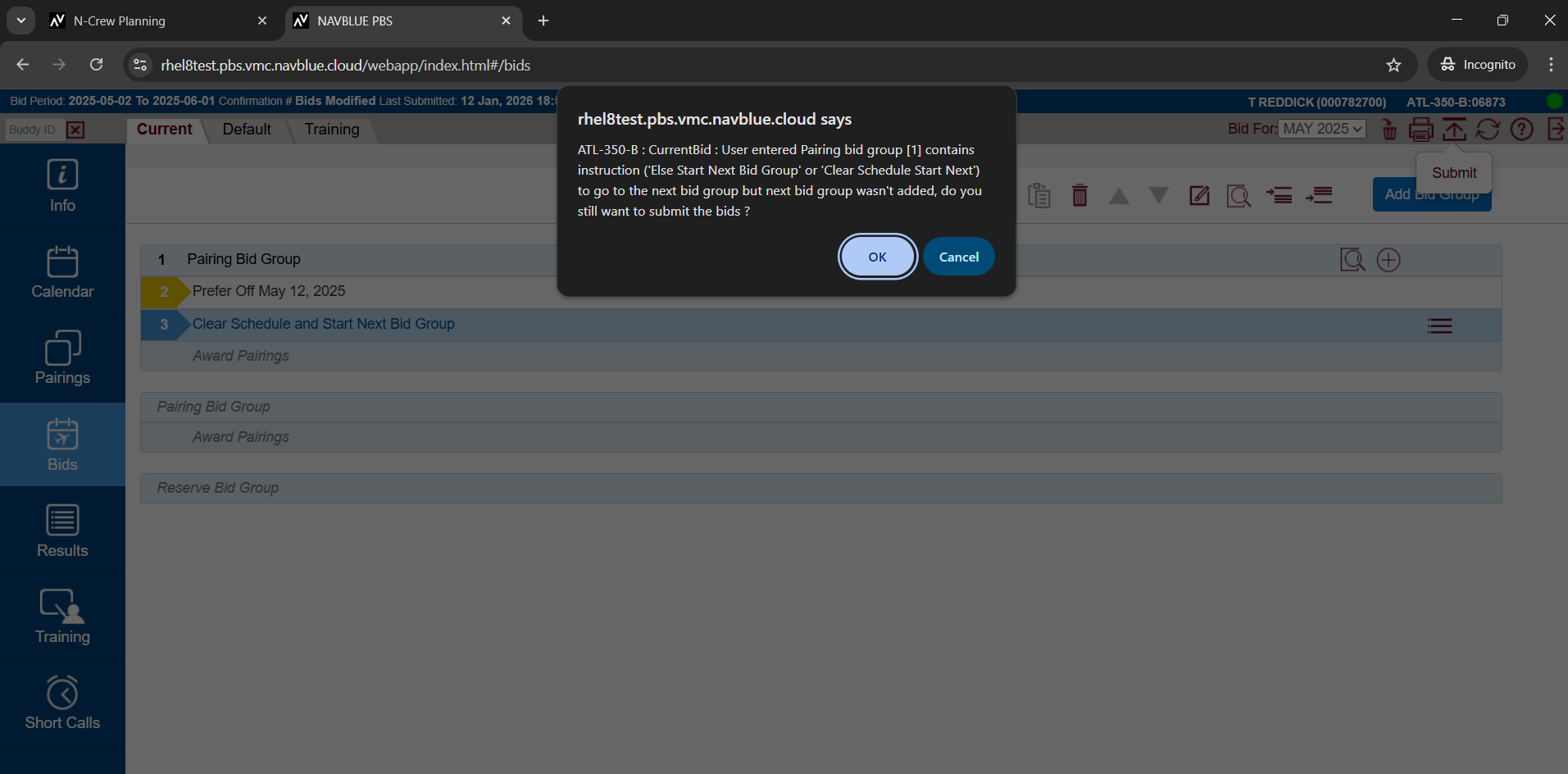
Precise Line Identification: Replaced generic warnings with detailed notices that explicitly state the bid group name and specific line numbers containing unlinked "Else Start Next Bid Group" statements.
Current & Default Tab Support: Validation notifications now account for unlinked transitions on both Current and Default bid tabs, displaying clear, structured warnings if issues exist across one or both tabs simultaneously.
Improved Interface Readability: Warning message text and line indentations have been reformatted for maximum clarity, providing actionable context before asking bidders if they wish to proceed with submission.
Acceptance Criteria
GIVEN any bidder
WHEN there is a pairing or reserve bid group with an Else Start Next Bid Group & there is no following user-generated bid group & when I click submit
THEN I will see the new updated warning message with the updated UI
GIVEN any bidder
WHEN there is a pairing or reserve bid group with an Else Start Next Bid Group & there is a following user-generated bid group & when I click submit
THEN I will NOT see the new updated warning message.
S-109520 Community - Associating a position with a language - Fixed Position Customers
Description
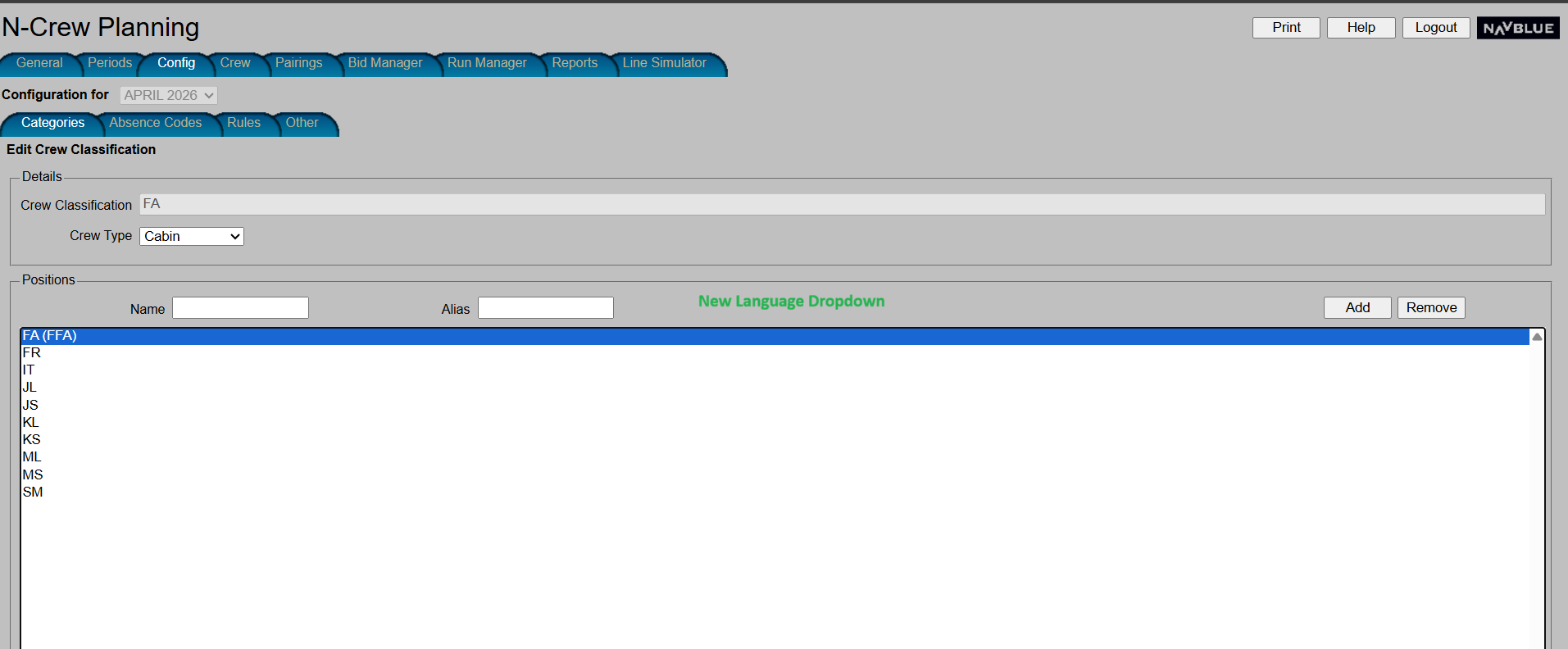
Administrators can now associate specific required languages directly with crew positions when adding or editing crew classifications in the Admin UI. A new "Required Language" dropdown allows selecting from all system-configured languages. Additionally, position displays across the system have been enhanced to clearly indicate associated aliases and required languages (for example, FA (Alias - FFA) or IT (Language - Italian)), providing full visibility into position qualifications.
Acceptance Criteria
GIVEN a admin for an ALC who do have a fixed position language ( only ASA & HALC)
WHEN adding/editing crewclassification
THEN I will see the new language dropdown
&
THEN all existing position which have languages linked will show in the table with languages , eg IT (Language - IT)
&
WHEN after adding a new position with the name FA and Alias FFA
THEN the system will display FA (Alias - FFA)
&
WHEN after adding a new position with the name FA and Language French
THEN the system will display FA (Language - French)
&
WHEN after adding a new position with name FA, Alias FFA, and Language French
THEN the system will display FA (Alias - FFA) (Language - French)
GIVEN a admin for an ALC who does not have a fixed position language ( anyone except ASA & HALC)
WHEN adding/editing crewclassification
THEN I will not see the language dropdown
S-107855 Community - Current/Default tab - Improve Empty User Generated Bid group Warning Message on Submission for Pairing Bid Group
Description
Enhanced Submission Warnings for Incomplete Bid Groups
- Location-Specific Formatting: Replaced generic error text with a clean, structured summary highlighting the exact tab (Current or Default), bid type (Pairing or Reserve), and line number of every empty bid group.
- Cross-Tab Support: Consolidates empty group detections across both Current and Default tabs into a single, cohesive warning prompt rather than showing disjointed popups.
- Clear Confirmation Options: Presents formatted line breaks and a clear "Do you want to continue your submission?" prompt with simple Yes/No actions for faster decision-making.
Acceptance Criteria
GIVEN any bidder
WHEN I have an empty user generated pairing bid group
THEN I will see the appropriate error message based on the scenario mentioned in the description
S-114360 Community - Enhancement - Sanitize bidding info text input
Description
Upgraded character encoding support in the Bidder UI to automatically parse and convert non-UTF-8 formatted text into UTF-8 upon entry. This ensures that copying and pasting special characters, symbols, or external text into Bidding Information loads seamlessly without causing rendering errors or interface failures.
Acceptance Criteria
GIVEN a PBS admin is adding/editing the Bidding Info text
WHEN adding special characters mentioned in freshdesk 376923 are added
THEN the system will convert them to the UTF-8 format so that the system can parse the input and save the text
&
THEN the system will also display the saved bidding info text on the bidder UI, Info tab, Bidding information section.
GIVEN a PBS admin is adding/editing the Bidding Info text
WHEN adding special characters mentioned in freshdesk 375581 are added
THEN the system will convert them to the UTF-8 format so that the system can parse the input and save the text
&
THEN the system will also display the saved bidding info text on the bidder UI, Info tab, Bidding information section.
GIVEN a PBS admin is adding/editing the Bidding Info text
WHEN adding special characters mentioned in freshdesk 376816 are added
THEN the system will convert them to the UTF-8 format so that the system can parse the input and save the text
&
THEN the system will also display the saved bidding info text on the bidder UI, Info tab, Bidding information section.
GIVEN a PBS admin is adding/editing the Bidding Info text
WHEN adding any special characters that are not in the UTF-8 format
THEN the system will convert them to the UTF-8 format so that the system can parse the input and save the text
&
THEN the system will also display the saved bidding info text on the bidder UI, Info tab, Bidding information section.
GIVEN a PBS admin is adding/editing the Bidding Info text
WHEN adding any special characters that are not in the UTF-8 format
THEN the system should not throw an error.
S-117469 Community -Slide Vacation - Numeric Input Data Correction - Range Option
Description
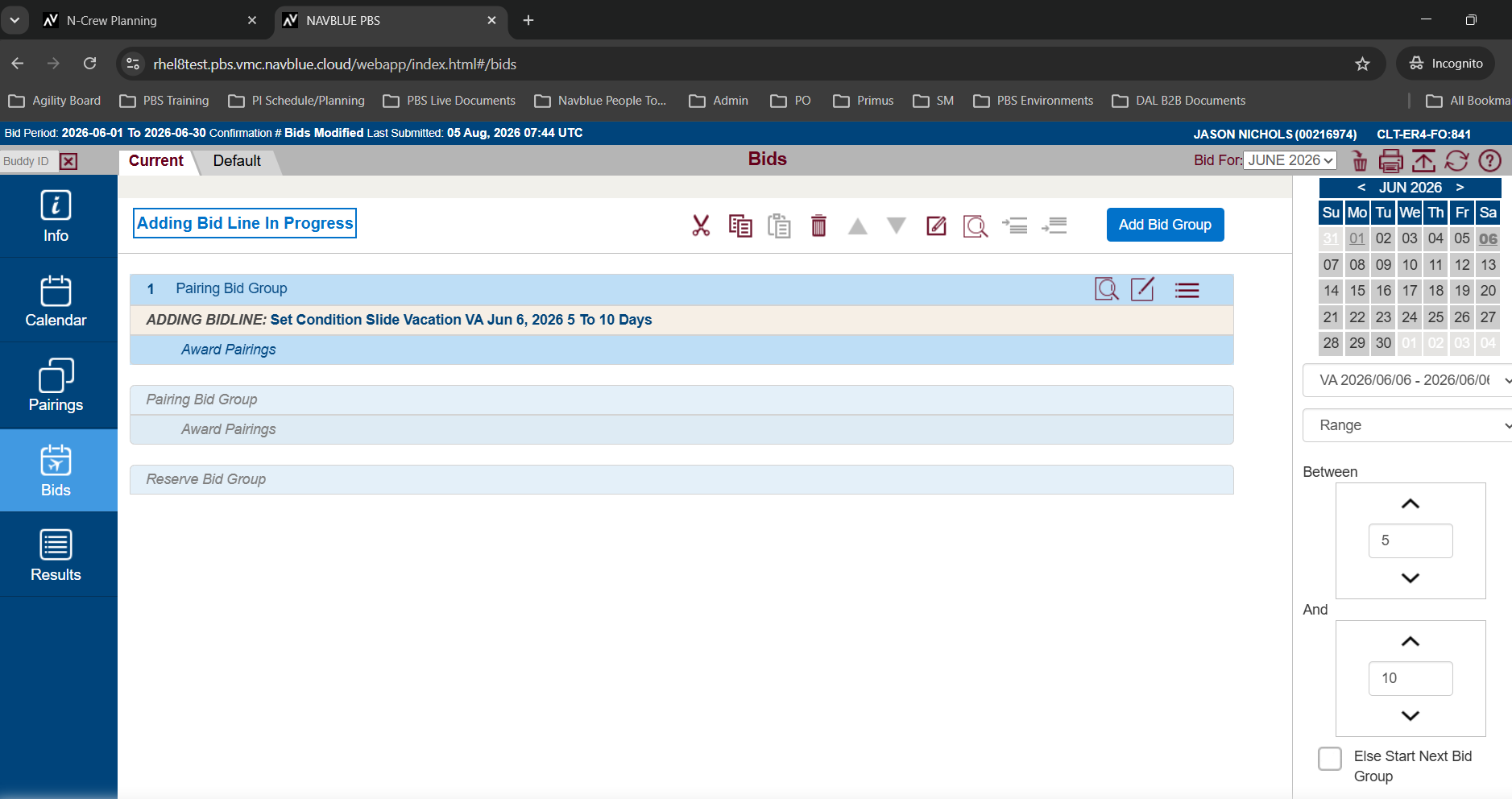
Updated the Bidder UI to automatically enforce allowed numerical boundaries for the "Range" option in Slide Vacation bid preferences. If a bidder enters a value exceeding the airline-configured maximum limit, the system automatically corrects the input to the maximum allowable threshold (matching the existing behavior of the "Exactly =" option). This prevents invalid values from being saved and eliminates potential submission failures.
Acceptance Criteria
GIVEN any ALC with the slide vacation set condition is enabled
WHEN that ALC's bidder manually enters slide vacation range values, and the values are out of range
THEN the system will auto-correct any input outside the allowed range to the nearest boundary, so that only allowable values are used.
S-99174 Community -Email-Bidding is open/closed
Description
Bidding Open/Close Broadcast Email Notifications
- Automated Bidding Notifications: Sends automated emails to all registered crew members when Overall Pairing or Reserve Bidding opens ("Bidding Open") or closes ("Bidding Closed"), keeping crew informed of their active bidding windows.
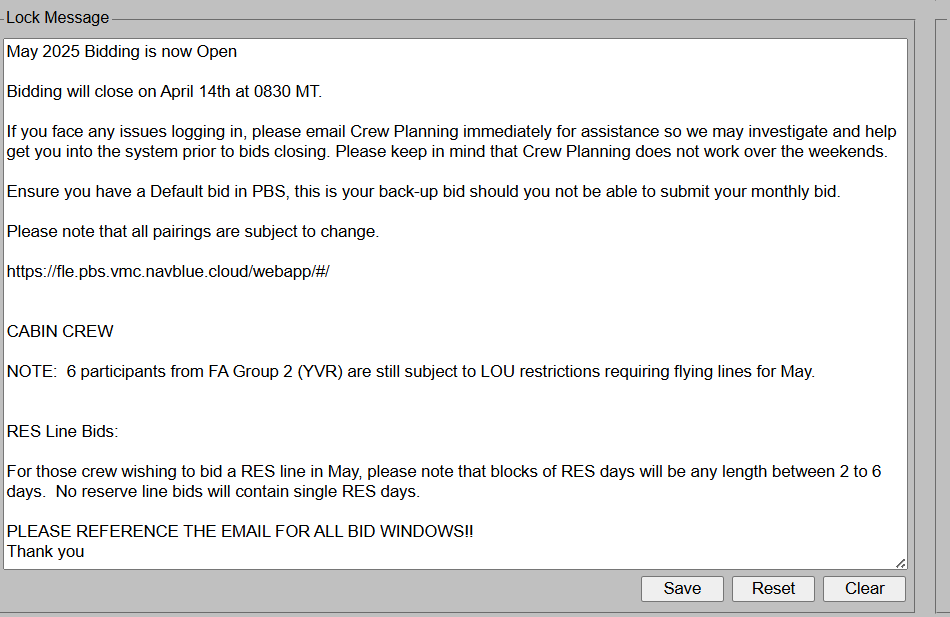
- Full Lock Message Content: Broadcast emails deliver the complete lock message text configured in the Admin UI, including custom instructions and footers.
- Administrative Broadcast Toggle: Includes an opt-in confirmation checkbox in the Admin UI to enable email sending. The toggle defaults to unchecked and automatically resets upon logout or when a new bid period is loaded to prevent unintentional sends.
- Scope: Applies exclusively to Overall Pairing and Reserve Bidding status changes (excludes Training Bidding status changes).
Acceptance Criteria
GIVEN a PBS system
WHEN a bid period is setup
THEN the send email checkbox should be unchecked by default.
GIVEN a PBS system
WHEN an admin UI logs out and logs back in
THEN the send email checkbox should be unchecked.
GIVEN a PBS system
WHEN a bid period is setup and the checkbox is checked and the admin UI logs out and logs back in
THEN the send email checkbox should be unchecked.
GIVEN a PBS system
WHEN a lock message is provided
And the checkbox is checked
And the period is opened or closed
THEN the PBS system will send this lock message via email to all eligible bidders.
GIVEN a PBS system
WHEN a lock message is empty
And the checkbox is checked
And the period is opened or closed
THEN the PBS system will send an empty message via email to all eligible bidders (only info that the bidding period is open/closed)
GIVEN that the sendemail checkbox is not checked
WHEN a category's bidding is opened
THEN the PBS system will not send a bidding open email to all eligible bidders.
GIVEN that the sendemail checkbox is checked
WHEN a category's bidding is opened
THEN the PBS system will send a bidding open email to all eligible bidders.
GIVEN that the sendemail checkbox is not checked
WHEN a category's bidding is closed
THEN the PBS system will not send a bidding closed email to all eligible bidders.
GIVEN that the sendemail checkbox is checked
WHEN a category's bidding is closed
THEN the PBS system will send a bidding closed email to all eligible bidders.
GIVEN an Ineligible bidder
WHEN the bidder's category bidding is opened & the sendemail checkbox is checked
THEN the PBS system will not send a bidding open email to the bidder's registered email address.
GIVEN an Ineligible bidder
WHEN the bidder's category bidding is closed & the sendemail checkbox is checked
THEN the PBS system will not send a bidding closed email to the bidder's registered email address.
S-109292 Community -superfluous trip enhancement
Description
Automated Superfluous Trip Pruning Logic Extension
Universal Award Bid Coverage: Extended superfluous trip removal to apply to any bid line's final evaluated award bid (rather than restricting pruning strictly to system-generated fallback bids or Min Credit bidders).
Threshold Protection: Automatically detects and prunes single trips from the last used award bid if the line already meets or exceeds its configured credit window threshold.
Preserved Bidding Constraints: Maintains important operational safeguards—superfluous trip removal will not break line legality, undo second-processed buddy awards, disrupt trip-stack coverage, or break linked sequences (such as Followed-By or Hub-Turn bids).
Swap Boundary Protection: Enforces dynamic credit limits during junior line swaps to prevent senior line replacements from creating new superfluous trip conditions.
Acceptance Criteria
GIVEN - a developer examining scheduler log files from some large runs (data copied from customer systems)
WHEN - inspecting the scheduler log files
THEN - I will be able to see messages showing when superfluous trips were removed and by examining those messages and analyzing the surrounding log file details I will be able to verify that the functionality is working correctly.
S-102425 Community -ASBY - Legality Conflict - Absence Code Flag
Description
Added a configurable "Counts as FDP" flag for absence and reference activity codes to ensure accurate Flight Duty Period calculations under FARs and system regulations. When enabled on specific duty types—such as standalone Airport Standby or airport waiting time resulting from flight delays and cancellations—the system now properly includes these durations within the total FDP calculation rather than truncating duty after the last operated flight segment.
Acceptance Criteria
GIVEN an VXP Planner
WHEN the customer is configured to show the new "Counts as FDP" flag
THEN this flag will be visible on the absence code add/edit screen
GIVEN any other customer
WHEN the customer is not configured to show the new "Counts as FDP" flag
THEN this flag will not be visible on the absence code add/edit screen
S-108376 Community -ASBY - Legality Conflict - Scheduler Changes
Description
Updated FAR 117 duty limit rules (specifically FAR 117.23 cumulative FDP limits) to evaluate Flight Duty Period (FDP) accrued from absences flagged as "Counts as FDP." The calculation engine now measures duty start and end times for applicable absences alongside standard pairing duty periods when calculating cumulative FDP totals over specified lookback windows. Violations are automatically bypassed if all involved activities are pre-awarded events.
Acceptance Criteria
GIVEN an VXP admin
WHEN doing a scheduler run or line simulator test
THEN absences with the "Counts as FDP" flag will count towards the rules Far_117_23c1 and Far_117_23c2 ( minimal manual testing required as we will test through unit tests.)